
MultiConnect Conduit IP67 Base Station Hardware Guide
Models: MTCDTIP-L4E1-266x-868, MTCDTIP-L4E1-267x-868, MTCDTIP-266x-868, MTCDTIP-267x-868, Global Ethernet-Only Conduit IP67 Base Stations MTCDTIP-266A-915 and MTCDTIP-267A-915
Document Part Number: S000837 Rev. 1.0
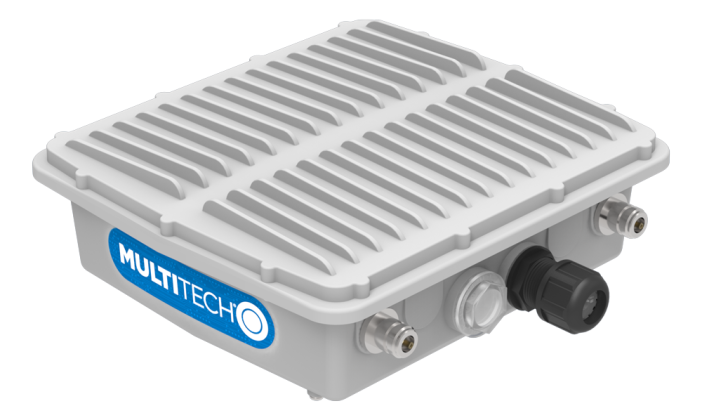
About the Conduit® IP67 Base Station
Related Documentation
Installing the Device
An installation guide ships with the MCDTIP and is also available at https://www.multitech.com/brands/multiconnect-conduit-ip67.
Getting Started with mPower Models
Devices that ship with mPower have -2xxA in the model number.
- (S00727) mPowerTM Edge Intelligence Conduit AEP Software Guide includes steps for configuring your device and provides details on the user interface.
- http://www.multitech.net/developer/software/aep/ links to advanced information including getting started with LoRa devices and creating custom apps.
Getting Started with mLinux Models
Devices that ship with mLinux have -2xxL in the model number.
- Getting Started with mLinux models information is available on the multitech.net developer website.
- http://www.multitech.net/developer/software/mlinux/ links to details about using mLinux
LoRa References
- http://www.multitech.net/developer/software/lora/ links to LoRa information.
AT Command References
The following AT Command Reference Guides are available at https://www.multitech.com/brands/multiconnect-conduit-ip67. Click your model, then select Manuals to find the AT Command Guide for your device.
- Telit LE910Cx AT Commands Reference 80502ST10950A
Safety Instructions
Installation Safety
This information is also available in the Installation Guide, in the box and available at https://www.multitech.com/brands/multiconnect-conduit-ip67. Select your model to find the correct installation guide for your device.
 Warnings and
  Cautions
Warning and Caution symbols mean potential danger. You are in a situation that could cause bodily injury. Before working on any equipment, be aware of hazards in the installation area and be knowledgeable about electrical circuitry. Be familiar with standard practices for preventing accidents.
- When installing or replacing the unit, the ground connection must always be made first and disconnected last.
- Disconnect PoE power (Ethernet PoE port) before servicing the device.
- Do not work on the system or connect or disconnect cables during periods of lightning activity.
- This device is not designed or approved to be used in any Hazardous Locations. Do not install or operate device if area is known to be an explosive environment.
- Externally ground this equipment using a customer-supplied ground wire before applying power. Contact an electrician if you are uncertain that suitable grounding is available. Refer to Installing the Ground Wire instructions in the Installation Guide (available at https://www.multitech.com/brands/multiconnect-conduit-ip67). All wall mounting installations are subject to the acceptance of local jurisdiction.

HOT SURFACE DO NOT TOUCH
Operation Safety
ATTENTION: Lisez toutes les instructions et consignes de sécurité avant d'installer ou d'utiliser cet appareil.
- Follow all local laws, regulations, and rules for operating a wireless device.
- Use the device security features to block unauthorized use and theft.
- Unless otherwise noted, antennas are not approved for outdoor use. Do not extend any antenna outside of any building, dwelling, or campus.
- Do not attempt to disassemble the device. There are no user-serviceable parts inside.
- Do not misuse the device. Follow instructions on proper operation and only use as intended. Misuse could make the device inoperable, damage the device or other equipment, or harm users.
- Do not apply excessive pressure or place unnecessary weight on the device. This could result in damage to the device or harm to users.
- Do not use this device in explosive or hazardous environments unless the model is specifically approved for such use. The device may cause sparks. Sparks in explosive areas could cause an explosion or fire that may result in property damage, severe injury, or death.
- Do not expose the device to any extreme environment where the temperature or humidity is high. Such exposure could result in damage to the device or cause a fire. See the device specifications for recommended operating temperature and humidity.
- Do not expose the device to water, rain, or other liquids. It is not waterproof. Exposure to liquids could result in damage to the device.
- Using accessories, such as antennas, that MultiTech has not authorized or that are not compliant with the device accessory specifications may invalidate the warranty.
If the device is not working properly, contact MultiTech technical support.
Lithium Battery
- A lithium battery (3V, coin cell, CR1632) located within the product provides backup power for the timekeeping. If the device is left powered off, the battery lasts approximately 90 days.
- When this battery starts to weaken, the date and time may be incorrect.
- Battery is not user replaceable. If the battery fails, the device must be sent back to MultiTech Systems for battery replacement.
- Lithium cells and batteries are subject to the Provisions for International Transportation. Multi-Tech Systems, Inc. confirms that the Lithium batteries used in the MultiTech product(s) referenced in this manual comply with Special Provision 188 of the UN Model Regulations, Special Provision A45 of the ICAO-TI/IATA-DGR (Air), Special Provision 310 of the IMDG Code, and Special Provision 188 of the ADR and RID (Road and Rail Europe).
ATTENTION: Risque d'explosion si vous remplacez la batterie par un modèle incompatible. Jetez les piles usagées selon les instructions.
Notice regarding Compliance with FCC, EU, and Industry Canada Requirements for RF Exposure
The antenna intended for use with this unit meets the requirements for mobile operating configurations and for fixed mounted operations, as defined in 2.1091 of the FCC rules for satisfying RF exposure compliance. This device also meets the European RF exposure requirements of EN 62311. If an alternate antenna is used, consult user documentation for required antenna specifications.
Compliance of the device with the FCC, EU, and IC rules regarding RF Exposure was established and is given with the maximum antenna gain as specified above for a minimum distance of 35 cm between the devices radiating structures (the antenna) and the body of users. Qualification for distances closer than 35 cm (portable operation) would require re-certification.
Wireless devices could generate radiation. Other nearby electronic devices, like microwave ovens, may also generate additional radiation to the user causing a higher level of RF exposure.
Radio Frequency (RF) Safety
Due to the possibility of radio frequency (RF) interference, it is important that you follow any special regulations regarding the use of radio equipment. Follow the safety advice given below.
- Operating your device close to other electronic equipment may cause interference if the equipment is inadequately protected. Observe any warning signs and manufacturers’ recommendations.
- Different industries and businesses restrict the use of cellular devices. Respect restrictions on the use of radio equipment in fuel depots, chemical plants, or where blasting operations are in process. Follow restrictions for any environment where you operate the device.
- Do not place the antenna outdoors.
- Turn off your wireless device when in an aircraft. Using portable electronic devices in an aircraft may endanger aircraft operation, disrupt the cellular network, and may be illegal. Failing to observe this restriction may lead to suspension or denial of cellular services to the offender, legal action, or both.
- Turn off your wireless device when around gasoline or diesel‑fuel pumps and before filling your vehicle with fuel.
- Turn off your wireless device in hospitals and any other place where medical equipment may be in use.
Sécurité relative aux appareils à radiofréquence (RF)
À cause du risque d'interférences de radiofréquence (RF), il est important de respecter toutes les réglementations spéciales relatives aux équipements radio. Suivez les conseils de sécurité ci-dessous.
- Utiliser l'appareil à proximité d'autres équipements électroniques peut causer des interférences si les équipements ne sont pas bien protégés. Respectez tous les panneaux d'avertissement et les recommandations du fabricant.
- Certains secteurs industriels et certaines entreprises limitent l'utilisation des appareils cellulaires. Respectez ces restrictions relatives aux équipements radio dans les dépôts de carburant, dans les usines de produits chimiques, ou dans les zones où des dynamitages sont en cours. Suivez les restrictions relatives à chaque type d'environnement où vous utiliserez l'appareil.
- Ne placez pas l'antenne en extérieur.
- Éteignez votre appareil sans fil dans les avions. L'utilisation d'appareils électroniques portables en avion est illégale: elle peut fortement perturber le fonctionnement de l'appareil et désactiver le réseau cellulaires. S'il ne respecte pas cette consigne, le responsable peut voir son accès aux services cellulaires suspendu ou interdit, peut être poursuivi en justice, ou les deux.
- Éteignez votre appareil sans fil à proximité des pompes à essence ou de diesel avant de remplir le réservoir de votre véhicule de carburant.
- Éteignez votre appareil sans fil dans les hôpitaux ou dans toutes les zones où des appareils médicaux sont susceptibles d'être utilisés.
Interference with Pacemakers and Other Medical Devices
Radio frequency energy (RF) from cellular devices can interact with some electronic devices. This is electromagnetic interference (EMI). The FDA helped develop a detailed test method to measure EMI of implanted cardiac pacemakers and defibrillators from cellular devices. This test method is part of the Association for the Advancement of Medical Instrumentation (AAMI) standard. This standard allows manufacturers to ensure that cardiac pacemakers and defibrillators are safe from cellular device EMI.
The FDA continues to monitor cellular devices for interactions with other medical devices. If harmful interference occurs, the FDA will assess the interference and work to resolve the problem.
Precautions for Pacemaker Wearers
If EMI occurs, it could affect a pacemaker in one of three ways:
- Stop the pacemaker from delivering the stimulating pulses that regulate the heart's rhythm.
- Cause the pacemaker to deliver pulses irregularly.
- Cause the pacemaker to ignore the heart’s own rhythm and deliver pulses at a fixed rate.
Based on current research, cellular devices do not pose a significant health problem for most pacemaker wearers. However, people with pacemakers may want to take simple precautions to be sure that their device doesn't cause a problem.
- Keep the device on the opposite side of the body from the pacemaker to add extra distance between the pacemaker and the device.
- Avoid placing a turned-on device next to the pacemaker (for example, don’t carry the device in a shirt or jacket pocket directly over the pacemaker).
Vehicle Safety
When using your device in a vehicle:
- Do not use this device while driving.
- Respect local regulations on the use of cellular devices in vehicles.
- If incorrectly installed in a vehicle, operating the wireless device could interfere with the vehicle’s electronics. To avoid such problems, use qualified personnel to install the device. The installer should verify that the vehicle electronics are protected from interference.
- Using an alert device to operate a vehicle’s lights or horn is not permitted on public roads.
- UL evaluated this device for use in ordinary locations only. UL did not evaluate this device for installation in a vehicle or other outdoor locations. UL certification does not apply or extend to use in vehicles or outdoor applications.
Specifications
L4E1-Base Station Specifications
Base Station specifications depend on the hardware configuration for your model.
| Category | Description |
|---|---|
| General | |
| Performance | LTE FDD Cat 4, 3GPP release compliant |
| HSPA+ 21 / GPS fallback | |
| USB Port with Type A Receptacle, USB Interface is CDC-ACM compliant | |
| TCP/IP Functions | FTP, SMTP, SSL, TCP, UDP |
| Frequency Bands (MHz) | 4G: B1, B3, B7, B8, B20, B28A |
| 3G: B1, B3, B8 | |
| 2G: B3, B8 | |
| Speed | |
| Data Speed | LTE 150 Mbps downlin/50 Mbps uplink |
| HSPA+ 42 Mbps downlink | |
| Physical Description | |
| Weight | V1.5: 5.15 lbs (2.34 kg) |
| Dimensions | Refer to Dimension Drawing. |
| Environment | |
| *Operating Temperature | -30° C to +70° C |
| Humidity | 20%-90% RH, non-condensing |
| Power Requirements | |
| Input Power | Power over Ethernet 37-57 Volts DC. |
| Certifications | |
| Country Approval | RED (EU) |
| Radio & EMC Compliance | EN 55022:2010 |
| EN 301 489 | |
| Safety Compliance | UL 60950-1 2nd Ed. |
| IEC60950-1(EU) | |
*Please consult with MultiTech if interested in extended temperatures.
LoRa Specifications
Depending on the model, your device has one or two LoRa radios. If the model number includes -868/2 or -915/2, the device has two LoRa radios.
| Category | Description |
|---|---|
| General | |
| Standards | LoRaWAN 1.0.2 specifications |
| Radio Frequency | 915 MHz ISM band |
| Certifications and Compliance | |
| EMC and Radio Compliance - Europe | EN 61000-3-3:2013 |
| EN 61000-3-2:2006 (Amended by A1:2009 and A2:2009) | |
| EN 55022:2010 | |
| EN 300 220-1 v3.1.1 | |
| EN 300 220-2 v3.1.1 | |
| RSS-210 | |
| EN 301 489-1 v2.2.0 | |
| EN301 489-3 V2.1.1 (2017-3) | |
| EN 55032:2012 | |
| Safety Compliance - Europe | IEC 60950-1 2nd Ed. Am.1 and Am.2 |
| Environment | IEC/CSA/UL60950-22 and IP67 |
L4N1 Base Station Specifications
Base Station specifications depend on the hardware configuration for your model.
| Category | Description |
|---|---|
| General | |
| Standards | LTE FDD Cat4, 3GPP release compliant |
| HSPA+ 21/GPRS fillback | |
| USB Port with Type A Receptacle, USB Interface is CDC-ACM compliant | |
| TCP/IP Functions | FTP, SMTP, SSL, TCP, UDP |
| Frequency Bands (MHz) | 4G: B2, B4, B5, B12, B13, B14, B66, B71 |
| 3G: B2, B4, B5 | |
| Speed | |
| Data Speed | LTE FDD: Max 150 Mbps (DL)/Max 50 Mbps (UL) |
| HSPA+ : Max 42 Mbps (DL) | |
| Physical Description | |
| Weight | V1.5: 5.15 lbs (2.34 kg) |
| Dimensions | Refer to Dimension Drawing. |
| Environment | |
| *Operating Temperature | -30° C to +70° C |
| Humidity | 20%-90% RH, non-condensing |
| Power Requirements | |
| Input Power | Power over Ethernet 37-57 Volts DC. |
| Certifications | |
| Country Approval | FCC/ IC |
| Radio & EMC Compliance | FCC Part 15 Class B/IC Class B |
| FCC Part 22H, 24E, 27, 90 | |
| Safety Compliance | UL 60950-1 2nd Ed. |
| cUL 60950-1 2nd Ed | |
| Environment | IEC/CSA/UL60950-22 and IP67 |
| Telecom Approvals | AT&T / Verizon |
*Please consult with MultiTech if interested in extended temperatures.
LoRa Specifications
Depending on the model, your device has one or two LoRa radios. If the model number includes -868/2 or -915/2, the device has two LoRa radios.
| Category | Description |
|---|---|
| General | |
| Standards | LoRaWAN 1.0.2 specifications |
| Radio Frequency | 915 MHz ISM band |
| Certifications and Compliance | |
| EMC and Radio Compliance - North America | RSS-210 |
| EN 301 489-1 v2.2.0 | |
| FCC 15.247 | |
| FCC 15.109 | |
| FCC 15.109(g) | |
| FCC 15.107 | |
| ICES-003 | |
| Safety Compliance - North America | UL 60950-1 2nd ED |
| cUL 60950-1 2nd ED | |
| Environment | IEC/CSA/UL60950-22 and IP67 |
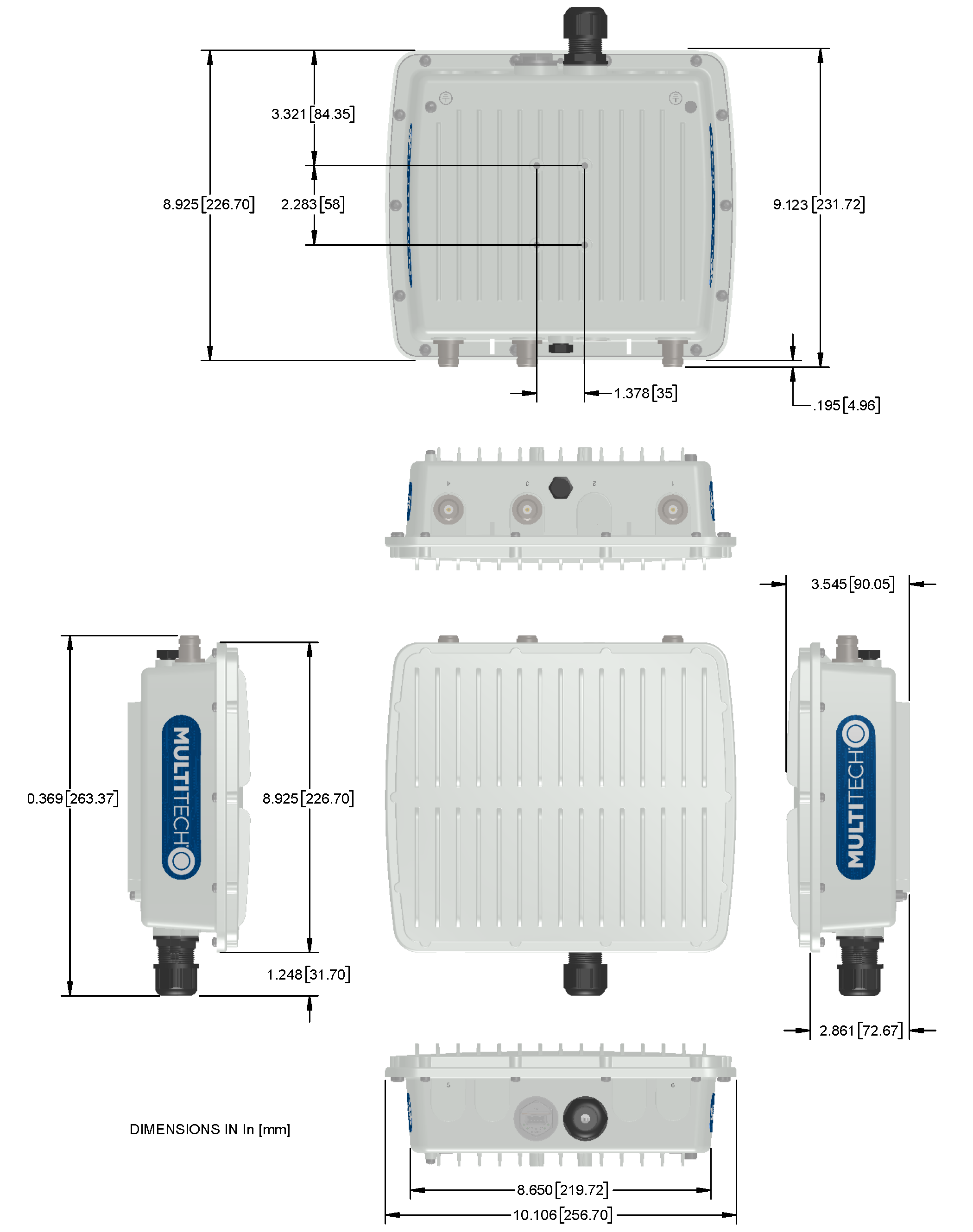
Dimensions
LEDs and Connectors
Connectors

| # | Connector | Description |
|---|---|---|
| 1 | LoRa | Connector for LoRa antenna. If the model has only one LoRa card, attach the LoRa antenna to this connector. |
| 2 | GPS | Connector for GPS antenna. |
| 3 | Wi-Fi/Bluetooth | For Wi-Fi/Bluetooth models, use this connector for the Wi-Fi antenna. |
| 4 | LoRa | Connector for LoRa antenna. Used only if the model has two LoRa cards. |
| 5 | Cell | For cellular models, use this connector for an LTE antenna. |
| 6 | Diversity | For cellular models, use this connector for the second LTE antenna. |
| -- | USB | Type A USB connector. Behind plastic cover. |
| -- | Ethernet Port | Ethernet port with IP67 rated cable gland. |
LEDs

| Label | LED | Description |
|---|---|---|
| PR | Power | Green when powered up. |
| ST | Status | A double green blink every second, a single red blink approximately every 3 seconds. |
| L1 | LoRa 1 | User-defined. Can be red or green. |
| L2 | LoRa 2 |
LED Programming Notes
mPower LED Notes
For mPower models
- The default state of the L1 and L2 LEDs depends on the cellular connection (connected/disconnected) and signal strength.
- To change the LED behavior modify the script /sbin/led_cd_ss.
mLinux LED Notes
For mLinux models
- The default state of the L1 and L2 LEDs is off.
- Users control L1 and L2 LEDs as follows:
For L1:
| Turn L1 Green | mts-io-sysfs store led-cd 1 |
| Turn L1 Red | mts-io-sysfs store led-sig1 1 |
| Turn L1 Off | mts-io-sysfs store led-cd 0 |
| AND | |
| mts-io-sysfs store led-sig1 0 |
For L2:
| Turn L2 Green | mts-io-sysfs store led-sig2 1 |
| Turn L2 Red | mts-io-sysfs store led-sig3 1 |
| Turn L2 Off | mts-io-sysfs store led-sig2 0 |
| AND | |
| mts-io-sysfs store led-sig3 0 |
Power Draw
| Radio Protocol | Cellular Call Box Connection No Data | Measured Current at Maximum Power1 | TX Pulse 2(AVG) Amplitude Current for GSM850 or Peak Current for HSDPA | Total Inrush Charge3 Measured in MilliCoulombs | Total Inrush Charge Duration during Powerup |
|---|---|---|---|---|---|
| 56.0 Volts | |||||
| LTE (WS46=31) Band 14 | 66 mA | 181 mA | 248 mA | 213 mC | 132 mS |
| WCDMA (WS46=22) | 63 mA | 180 mA | 256 mA | 213 mC | 132 mS |
| 42.0 Volts (Safety Testing Limit) | |||||
| LTE (WS46=31) Band 14 | 83 mA | 238 mA | 304 mA | 230 mC | 151 mS |
| WCDMA (WS46=22) | 80 mA | 238 mA | 308 mA | 230 mC | 151 mS |
1Maximum Power: The continuous current during maximum data rate with the radio transmitter at maximum power.
2TX Pulse: The average peak current during a GSM850 transmission burst period or HSDPA connection. The transmission burst duration for GSM850 can vary, depending on what transmission scheme is being deployed.
3Inrush Charge: The total inrush charge at power on.
LE910 Telit Transmission Output Power
| Band | Power Class |
|---|---|
| GSM 850/900 MHz | 4 (2W) |
| DCS 1800, PCS 1900 MHz | 1 (1W) |
| EDGE, 850/900 MHz | E2 (0.5W) |
| EDGE, 1800/1900 MHz | Class E2 (0.4W) |
| WCDMA/FDD 800/850/900, 1900/2100 MHz | Class 3 (0.25W) |
| LTE FDD 700/800/850/900, 1800/1900/2100/2600 MHz | Class 3 (0.2W) |
LoRa Transmission Output Power for MTAC-003
MTAC-003E00 (868 MHz)
Max output 24.5 dBm
| Power | Frequency | Bandwidth |
|---|---|---|
| 24.5 dBm | 869.525 MHz* | 125 kHz |
| 13.7 dBm | 868.95 MHz | 250 kHz |
*Note: Single-channel/high-power mode
MTAC-003U00 (915 MHz)
Max output 27.4 dBm
| Power | Frequency | Bandwidth |
|---|---|---|
| 27.4 dBm | 923.3 MHz | 500 kHz |
I2C Addresses
| Component | I2C Address (V2.1 Board) | I2C Address (Processor Board) | Comments |
|---|---|---|---|
| TCA9535 I/O Expander | 0100000 | ||
| LM 75AIM Temp Sensor | 1001001 | ||
| LPS25HB Pressure Sensor | 1011100 | ||
| 24C04 EEPROM | 101011x | LSB is A8 memory address bit | |
| TMP102A Temp Sensor (U2) | 1001000 | ||
| TMP102A Temp Sensor (U94) | 1001001 | Not populated | |
| TMP102A Temp Sensor (U95) | 1001010 | Not populated | |
| TMP102A Temp Sensor (U96) | 1001011 | Not populated | |
| GPS Receiver | 1000010 (default) | Can be changed by software |
Antenna Information
Antenna
Depending on the model, your Base Station ships with one or more of the following antennas.
| Manufacturer | Model | Description |
|---|---|---|
| L-Com | HGV-906U | 6dBi Gain IP67 Lora Antenna |
| Pulse | RO8063/21704NM | 3dBi Gain IP67 Lora Antenna |
Pulse Omnidirectional Antenna
| Manufacturer: | Pulse |
| Description: | Omnidirectional antenna 806-960/1710-2170 MHz radome |
| Model Number: | RO8063/21704NM |

Antenna Specifications
| Category | Description |
|---|---|
| Frequency Range | 806-960 MHz |
| 1710-2170 MHz | |
| VSWR | 2.5:1 Max |
| Gain, Maximum | 3.0 dBi ± 1 dB at 806-960 MHz |
| 4.0 dBi ± 1 dB at at 1710-2170 MHz | |
| Polarization | Vertical |
| Impedance | 50 Ω |
| Radiation Pattern | 3 dB Beamwidth |
| Horizontal Plane | Omni |
| Vertical Plane - 806-960 | 53° Avg |
| Vertical Plane – 1710-2170 | 39° Avg |
| Dimensions | 15.28 inches (388.5 mm) x 1.45 inches (36.9 mm) |
GTT IP67 GPS/GLONASS Antenna
| Manufacturer: | GTT |
| Description: | IP67 GPS/GLONASS Antenna |
| Model Number: | OE-GPSGLO-016-CN |
Antenna Specifications

| Category | Description |
|---|---|
| Frequency Range | 1575 – 1615 MHz |
| Bandwidth (10 dB return loss) | 43 MHz typ. |
| Gain at Zenith | 2.4 dBic @ 1575MHz |
| 42.85 dBic @ 1602MHz | |
| Polarization | RHCP |
| Dimensions | Diameter: 2.17 inches (55 mm) |
| Length: 2.52 inches (64 mm) excluding connector |
GTT IP67 Wi-Fi Antenna
| Manufacturer: | GTT |
| Description: | IP67 Wi-Fi Dual-Band N Type Antenna |
| Model Number: | OS-ISMDB-0507-CO |

Antenna Specifications
| Category | Description |
|---|---|
| Frequency Range | 2.4 - 2.5 GHz |
| 5.15 -5.875 GHz | |
| VSWR | 2.0: 1 Max |
| Radiation | Omni |
| Gain, Maximum | 4 dB at 2.4 GHz |
| 6 dB at 5 GHz | |
| Polarization | Linear, vertical |
| Impedance | 50 Ω |
| Antenna Efficiency | 60% Minimum |
| Dimensions | 0.9 inches (22 mm) x 7.0 inches (178 mm) excluding connector |
GTT LTE N Type Antenna
| Manufacturer: | GTT |
| Description: | LTE N Type Antenna |
| Model Number: | OS-LTE-11-CO |

Antenna Specifications
| Category | Description |
|---|---|
| Frequency Range | 690-960 MHz |
| 1710-2170 MHz | |
| 2500 -2690 MHz | |
| VSWR | 3.5:1 Max |
| Gain, Maximum | 1.1 dB at 690-960 MHz |
| 3.5 dB at 1710-2170 MHz | |
| 1.9 dB at 2500 -2690 MHz | |
| Polarization | Linear, vertical |
| Impedance | 50 Ω |
| HPBW- Horizontal | 360° |
| HPBW - Vertical | 60° |
| Dimensions | 0.9 inches (22 mm) x 7.0 inches (178 mm) excluding connector |
Regulatory Information
FCC Notices
FCC 47 CFR Part 15 Regulation Class B Devices
This equipment has been tested and found to comply with the limits for a Class B digital device, pursuant to part 15 of the FCC Rules. These limits are designed to provide reasonable protection against harmful interference in a residential installation. This equipment generates, uses, and can radiate radio frequency energy and, if not installed and used in accordance with the instructions, may cause harmful interference to radio communications. However, there is no guarantee that interference will not occur in a particular installation.
If this equipment does cause harmful interference to radio or television reception, which can be determined by turning the equipment off and on, the user is encouraged to try to correct the interference by one or more of the following measures:
- Reorient or relocate the receiving antenna.
- Increase the separation between the equipment and receiver.
- Connect the equipment into an outlet on a circuit different from that to which the receiver is connected.
- Consult the dealer or an experienced radio/TV technician for help.
FCC Interference Notice
- This device may not cause harmful interference, and
- This device must accept any interference received, including interference that may cause undesired operation.
Industry Canada Class B Notice
This Class B digital apparatus meets all requirements of the Canadian Interference‑Causing Equipment Regulations.
This device complies with Industry Canada license‑exempt RSS standard(s). The operation is permitted for the following two conditions:
- The device may not cause interference, and
- This device must accept any interference, including interference that may cause undesired operation of the device.
Cet appareil numérique de la classe B respecte toutes les exigences du Reglement Canadien sur le matériel brouilleur.
Le présent appareil est conforme aux CNR d'Industrie Canada applicables aux appareils radio exempts de licence. L'exploitation est autorisée aux deux conditions suivantes:
- L'appareil ne doit pas produire de brouillage, et
- L'appareil doit accepter tout brouillage radioélectrique subi, même si le brouillage est susceptible d’en compromettre le fonctionnement.
EU EMC, Safety, and R&TTE Directive (RED) Compliance
 The CE mark is affixed to this product to confirm compliance with the following European Community Directives:
- Council Directive 2011/65/EU on the restriction of the use of certain hazardous substances in electrical and electronic equipment; and
- Council Directive 2014/53/EU on radio equipment and telecommunications terminal equipment and the mutual recognition of their conformity.
- Council Directive 2014/35/EU on the harmonization of the laws of Member States relating to Electrical Equipment designed for use within certain voltage limits.
MultiTech declares that this device is in compliance with the essential requirements and other relevant provisions of Directive 2014/53/EU. The declaration of conformity may be downloaded at https://multitech.com/product-support/.
ANATEL Mark for Brazil
Resolução 680 – ATO 14448
Este equipamento não tem direito à prote ção contra interferência prejudicial e não pode causar interferência em sistemas devidamente autorizados. Para maiores informa ções, consulte o site da ANATEL – www.gov.br/anatel.
Resolution 680 – ACT 14448
This equipment is not entitled to protection against harmful interference and will not cause interference in duly authorized systems. For further information, please go to ANATEL’s website – www.gov.br/anatel.
CISPR22
Este produto não é apropriado para uso em ambientes domésticos, pois poderá causar interferências eletromagnéticas que obrigam o usuário a tomar medidas necessárias para minimizar estas interferências.
CISPR22
This product is not suitable for use in household environments, as it may cause electromagnetic interferences which require the user to take adequate measures to minimize these interferences.
Serbia Approval

Philippines Approval

Vietnam Certification
Environmental Notices
EU WEEE Directive
The Waste from Electrical and Electronic Equipment (WEEE) Directive places an obligation on EU‑based manufacturers, distributors, retailers, and importers to take back electronics products at the end of their useful life. A sister directive, ROHS (Restriction of Hazardous Substances) complements the WEEE Directive by banning the presence of specific hazardous substances in the products at the design phase. The WEEE Directive covers all MultiTech products imported into the EU as of August 13, 2005. EU‑based manufacturers, distributors, retailers and importers are obliged to finance the costs of recovery from municipal collection points, reuse, and recycling of specified percentages per the WEEE requirements.
EU RoHS 3 Directive
MultiTech confirms that all products comply with the chemical concentration limitations set forth in the Restriction of Hazardous Substances in Electrical and Electronic Equipment (RoHS 3) regulations for CE and UKCA, following the standard EN IEC 63000:2018.
For the current Certificate of Compliance for Hazardous Substances and additional regulatory documents, go to https://multitech.com/approvals-and-certifications/.
EU REACH‑SVHC Statement
Multi‑Tech Systems, Inc. confirms that none of its products or packaging contain any of the Substances of Very High Concern (SVHC) on the REACH Candidate List, in a concentration above the 0.1% by weight allowable limit.
For the current REACH‑SVHC statement and additional regulatory documents, go to https://multitech.com/approvals-and-certifications/.