
About the LoRaWAN® Wireless Outdoor/Industrial Temperature Sensors
|
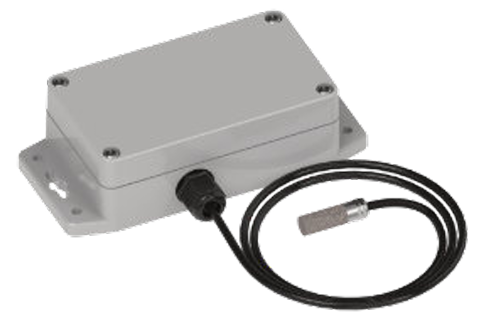
LoRaWAN® Air Temperature and Humidity Sensor with External Probe for Outdoor/Industrial Use This sensor uses air flow through a sintered porous stainless steel filter to allow for temperature and humidity measurements in outdoor and industrial environments. The sintered porous filter is IP54 rated to protect against dust and debris. This sensor can also be used for detecting freezing temperatures to protect plumbing, detect heat failure in second homes or remote buildings, detecting cooling system failures, and industrial temperature monitoring. |
 |
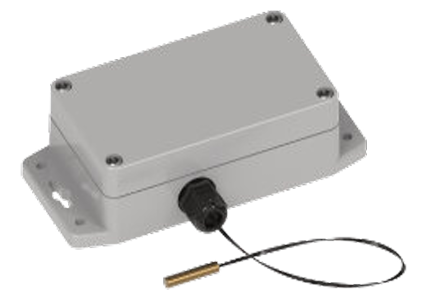
LoRaWAN® Temperature Sensor for Outdoor/Industrial Use This sensor uses an external probe to measure temperatures. Ideal for food service, cold chain monitoring, restaurants, laboratory monitoring, server rooms and warehouses. If the temperature rises above or falls below the configured threshold, an alert is sent to the wireless network. |
 |
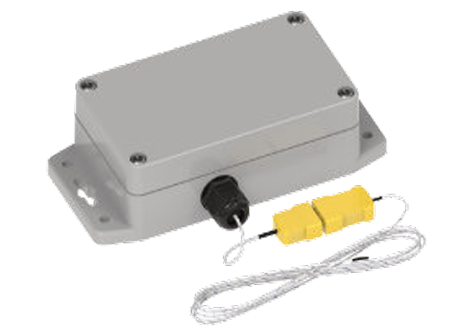
LoRaWAN® Thermocouple Temperature Sensor for Outdoor/Industrial Use This sensor measures temperature using an external K-type thermocouple. Other thermocouples may be used and can be configured via downlink messages. Multiple thermocouple types supported: B, E, J, K, N, R, S and T. The enclosure is suitable for outdoor and industrial use. Applications include gas turbine exhaust, diesel engines, industrial processes, flame sensor, petroleum refineries, appliance heating, and food processing and production. |
 |
Ordering Options
| Ordering Part Number | Description | Region |
|---|---|---|
| RBS306-ATH-EXT-US | LoRaWAN External-Probe Air Temperature & Humidity (Outdoor/ Industrial Use) |
Canada United States |
| RBS306-TEMP-EXT-US | LoRaWAN External-Probe Temperature (Outdoor/ Industrial Use) |
Canada United States |
| RBS306-TEMP-TC-US | LoRaWAN Thermocouple Temperature (Outdoor/ Industrial Use) |
Canada United States |
Specifications
| Category | Description | ||
|---|---|---|---|
| Operational Characteristics | |||
| LoRa® Region |
Canada United States |
Canada United States |
Canada United States |
| Sensor Type | LoRaWAN External-Probe Air Temperature & Humidity (Outdoor/ Industrial Use) | LoRaWAN External-Probe Temperature (Outdoor/ Industrial Use) | LoRaWAN Thermocouple Temperature (Outdoor/ Industrial Use) |
| Part Number | RBS306-ATH-EXT-US | RBS306-TEMP-EXT-US | RBS306-TEMP-TC-US |
| LoRa® Wireless | |||
| Frequency Band (MHz) | 902-928 | ||
| Channel Plan | US915 | ||
| Protocol | LoRaWAN compliant | ||
| Antenna Peak (typical) Antenna Gain | 1.3dBi | ||
| Power | |||
| Battery Powered | Yes | ||
| Battery Type/Qty | CR123A x 2 | ||
| User Replaceable | Yes | ||
| Battery Life | Optimized solution: up to 10 years battery life; see GitHub - MultiTech-Sensors/Technical_Information: Tech Data, Decoders, and Battery Life Calculators | ||
| Physical Characteristics | |||
| Sensor Type | External Air Temperature & Humidity | External Temperature | External Thermocouple |
| Dimensions (L×W×H) | 5.709" x 2.592" x 1.575" (145mm x 65.8mm x 40mm) | ||
| Weight | 200g (base weight without probe: 188g) | 194g (base weight without probe: 188g) | 225g (base weight without thermocouple: 188g) |
| Enclosure Type | ABS Plastic, IP54, outdoor rated | ||
| Mounting | Screw (w/Tamper) | ||
| Range | -40° to +60°C (Temperature) 10-90% (Humidity) | -20° to +60°C | -200°C to +1372°C (K Type) Additional J, N, R, S, T, E and B probes may be available |
| Resolution | 0.1°C (Temperature) 1% (Humidity) | 1°C | 0.1°C |
| Accuracy | +/-0.2°C Typ. from 0° to 50°C (Temp) +/-0.6°C Typ. from -40° to 0°C (Temp) 2% Typ. (Humidity) | +/- 1°C (1.6°F) @ 25°C | +/-3°C |
| Environmental | |||
| Operating Temperature | -40°C to +70°C | ||
| Operating Humidity | 10% to 90% (non-condensing) | ||
| Storage Temperature | -40°C to +45°C (battery life may be impacted due to temperature fluctuation) |
||
| Certifications | |||
| Compliance | FCC/IC, REACH, ROHS | ||
| Warranty | |||
| Warranty | 2-Years / www.multitech.com/legal/warranty | ||
See the LoRaWAN Wireless Sensors User Guide for more information.